Showing posts with label Kinder. Show all posts

Monday, December 26, 2016

Technology Tuesday: Coding with Kinder

My kinder students have seen the "big kids" using Dash in the library and they keep asking when they will get to play with it.  I talked with the kidner teachers and we decided that during December's Hour of Code would be a good time to introduce Dash to the students.  We had school for three weeks between our Thanksgiving and Winter breaks so I decided to do a progessive introduction for them.  We started the first week using the Kodable app on the iPad.


The second time they came I introduced them to Dash and the Wonder Path app where students could make Dash follow a path they traced on the ipad with their fingers.  They had such a blast with this. 


The third week, we tried using the Wonder Blockly app.  I showed them how they could use the words to make dash do different things and limited them to the Movement, Animation and Sound commands since most are nonreaders.  This was by far the most challenging for them because of the words, but they still enjoyed it.They loved finding new noises and animations for Dash. Their favorite was the burping sound and the kissing animation.  

Monday, October 31, 2016

Maker Monday: Kinder Halloween Makerspaces

When I started the makerspace at my school last year, I started it with 2nd-5th grades (you can read about that here). Thinking there was no way that I could run the makerspace the same way for kinders and 1st graders (if you read this blog consistently, you'll know about my panic attacks before each and every kinder class - haha) I decided I would see how it went the first year and try to figure out a way to give them opportunities the second year.

Well, in May last year, I decided to experiment and see if my kinder teachers wanted to come as a class to the makerspace to try a challenge.   You can read "5 Things I Learned From Kinder Makerspace" here.  I really liked this format so that is how I wanted to continue this year with them.

I found some Halloween STEM challenges on pinterest that I liked and couldn't narrow down which one I wanted to try so I decided to do 4, one each week in October (I know, I get crazier and crazier). I got the ideas from this blog and this one.  

Week 1: Build the tallest tower to hold a pumpkin.


Week 2: Make a monster bookmark (the bookmark folding was direct teach, but then they could decorate however they wanted)


Week 3: Make a Paper Bat Fly


Week 4: Design a Candy Tosser

The teachers and I had so many "Wow" moments watching the students these 4 weeks.  Like this student who was using pipe cleaners to hold 4-5 empty boxes together to make his tower for the pumpkin.

And I wish I had video of the last student in the bat video above when he asked me if he could tape a pencil to his bat.  When I said yes, his face was priceless.  Totally did not believe me and said, "I mean this pencil... can I tape it to my bat?" I said yes again and he still stood there.  Hilarious!

While kinders exhaust me, I am always amazed at what they can do, think about, design, invent and make and I am always glad that I give them the opportunity to do those things. 


Friday, May 20, 2016

5 Things I learned from Kinder Makerspace


Kinder had their first experience in the makerspace this week... or let me rephrase I had my first experience with kinder in the makerspace this week! ;) I had one kinder class in each day to make a pompom launcher in the makerspace.  I really had no idea how this would work so here are 5 things I learned...

1.  Kinder kids LOVE glue!

2.  Kinder kids have great ideas! Yank the red pipe cleaner, the cup moves and the pompom comes out.


3.  Kinder kids can make things better!  She started with the pompom on the end of the straw, but it kept falling off before she could blow.  She looked in the bucket and found the lid to spices that had holes in it. The straw went through the hole and the pompom sat in the lid.  


4.  Kinder kids can think simple... or complex.


5.  EVERY kid can be a maker!


And one last thing... God Bless Kinder teachers!  I don't think I could do it every day!


Thursday, April 28, 2016

Poetry Month

I was at a loss as to what to do with K-2 during poetry month this year.  Luckily, the librarians in my district are so willing to share ideas.  Here is what I ended up doing with them.

Kinder:  "A Rainbow is..."  from The Bubbly Blonde Teacher blog.  I read My Many Colored Days by Dr. Seuss and then the kinders filled out the rainbow poem.
Of course, we had the standard answers... red as an apple, blue as water.  But we had some pretty creative ones also... purple as a plum, orange as a sunset, green as a lizard.  And I always love when they ask how to spell orange and I say it is right there on your paper and they say, "No, the orange that you eat".  They are amazed that the color and the food are spelled the same :)

1st Grade:  "Ouch" Poem from the First Grade W.O.W. blog.  I read about 6 of my favorite poems from Shel Silverstein's Where the Sidewalk Ends.  And then read the "Band-Aid" and "Sick" poems. We brainstormed a list of ways we can get hurt and then the wrote their poems.  I found some Minion Band-aids at the Dollar Store and gave those to the kids when they finished their poem.  
I love that this one started to rhyme and then gave up.


2nd Grade:  Shape Poems on the ipad using  Theme Poem app and Tagul website.

And we finished off the month participating in Poem in Your Pocket Day today.  


Tuesday, March 15, 2016

Technology Tues: Kinder Shadow Puppets

My kinder classes have each been researching a different animal in class and this year, instead of doing a different research project in the library, we decided to use their notes from the class to make videos in Shadow Puppet on the iPads.
I am not really sure why this app is called Shadow Puppet because there are no shadows and no puppets involved.  It is a video creating app using slides.  I have used 30 Hands with kinder before but wanted to try this because text can be written on the slides and there is a web image search within the app.  

We did this lesson over 4-5 thirty minute sessions.  In the first session, we made title slides in PicCollage.  I had chosen 4 pictures of each animal and loaded them onto the camera rolls of the iPads. We opened PicCollage, chose one of the pictures, added the name of the animal in a text box and then the student's name in another text box.  The student liked being able to change the color and the font of the writing in PicCollage.  Then they saved the picture to the camera roll. 

The next 3-4 sessions were for making the slides with the information they had been researching in class: what do they eat, look like, do and where do they live?  Each time I gave the student back the same iPad they originally had since all the work was saved on that iPad.  Each time we started by reviewing their class notes for one of the questions.  Then we opened Shadow Puppet, searched for a picture that matched our topic, wrote a sentence on the slide and then saved.  


The final session was for recording.  The teacher and I each called students one-by one to record their videos.  I think they turned out super cute.  


One thing that I did not like was the way the text broke in between words.  For example, in all the videos where we typed "penguins" the "s" is on the next line instead of making the word smaller so that it fit.  That might be something that is easily fixed but I have not figured it out yet.

All in all this was a fun project to do with the kinder kids.  

Tuesday, December 8, 2015

Technology Tuesday: Kodable

I decided to make sure that I did Hour of Code this year with kindergarten but to use an iPad app instead.  We are using Kodable and it is too fun!  The kids love trying to solve the puzzles and get really excited when they get it right.  The teachers were amazed at how the app just walked them through and they even grabbed an iPad and started working the puzzles as well.  I love that now they can add that app to their iPads in the classroom and use it as a station.

Thursday, October 15, 2015

Being Connected: Another Virtual Author Visit

Thanks again to twitter, the students at my school were involved in another virtual author visit.  This time with Kate DiCamillo.  Last year, Jarret Krosoczka tweeted about a live event he was going to be doing.  I sent the information out to the teachers and almost my whole school watched as he talked abot writing, illustrating and Platapus Police Squad.  You can read about that here.

Back in August, John Schu @MrSchuReads, tweeted about a video conference opportunity in October with Kate DiCamillo.
 I immediately emailed my teachers about this awesome opportunity (even though we were not yet back in school from summer vacation)!  

When school did start, one of my kinder teachers asked if I had any recommendations for a read aloud to do with her class.  I mentioned the Mercy Watson books and reminded her about the upcomming video conference with Kate.  She jumped on the idea and started reading her kids book one and they were hooked!  She would tell me that her kids LOVED the books and couldn't wait for the end of the day when she would read.  They sat mesmerized, still and quiet while she read. They loved how Mercy loved buttery toast and asked questions about why Eugenia didn't like Mercy.  She said in all her years of teaching kinder, she had never had kids respond to a book like that.  So of course when she finished book 1, they wanted to read book 2. So they did.  And another kinder class started book 1. 

Today, they came back from lunch and were so excited to see "Mercy's writer" on the screen and the books that they had read displayed behind her.  Everytime Kate mentioned Mercy, they would gasp and giggle.  They "oohed" and "ahhed" when she mentioned the "buttery toast".  It was really something to be able to connect them with an author of a story they had just adored.

Meanwhile, in 5th grade, more amazing things were happening.  One teacher told her kids about the video conference and that they would only be able to watch the beginning of it since their lunch happened to fall right in the middle of it.  Tonight on her blog, this teacher wrote "After I saw the expressions on their faces, I offered to have them get lunch from the cafeteria and come back to the room during lunch.  They all had smiles on their faces!"  She emailed me after school and said that her kids loved it.  They had watched the whole thing and told me that they had eaten lunch in the room, and that it was the first time ever in her teaching career (21 years) that she had eaten in her room.  Wow!  The power of being connected!  

I love being able to find these opportunites for my students and it is only because I stepped out of my comfort zone and started tweeting that I became connected and in turn can connect my students and teachers.  

Tuesday, September 15, 2015

Technology Tues: Dot Day

We are celebrating "Dot Day" again this year.  Dot Day is inspired by The Dot book by Peter Reynolds.  The Dot is the story of a teacher who encourages a student to trust in her own abilities by being brave enough to "make her mark". What begins as a small dot on a piece of paper becomes a a challenge to create bigger and more inspiring things. This movement has gone on to connect students and classrooms around the world.

This year, I made the "D" page in my kinder journal D is for Dot Day.  I shrunk the page that was given on the website to use with the Quiver 3D app and had the students color.
Then they brought their journal to me and we made their dot come alive.  It was so fun to see the amazement on their faces as their dot became 3D.
 

I also wanted to get in on the skyping part of Dot Day, so Matthew Winner and I connected our kinder classroom - Texas to Maryland.  The students from each class shared some of the Dot Day activities they had done and we please to discover that BOTH classes had made dots out of their initials.

While we were waiting for Mr Winner to call us, we sang the Dot Day song.


A fun Dot Day today and we have more stuff planned the rest of the week.  I love special events like this that put the "FUN" back in learning.  


Tuesday, May 19, 2015

Technology Tuesday: Nearpod

I attended a session about Nearpod at TCEA this year and I know a few of our librarians LOVE it, but I hadn't been brave enough to try it until now.
Nearpod is an interactive presentation tool.  It keeps the students engaged as the teacher controls the lesson from their computer or iPad.  The teacher can push out content, activities, questions, polls and quizzes to each iPad.  There are many already created nearpod lessons or you can customize your own.  

I decided to try this with kinder this week since they were still coming for a story, but not checking out, we had some extra time to try it.  I created a very simple lesson about plants to complete after we read a book about plants.  I chose From Seed to Plant by Gail Gibbons for our story.

After we read, I passed out the iPads (one iPad for 2 students).  I was projecting my iPad and controlling the lesson from my computer because I wanted to be able to model the different activities since we were doing it for the first time.  The first thing they had to do was type in the lesson code and then their names.  On my computer screen I could see as they entered their names.  Then I clicked to turn the page on my computer which in turn changed the page on their iPads.  Since we read the book first, I did not include any content in this first lesson.  Each of the 4 pages was an activity.  I included a fill in the blank activity of plant parts for the first page.  
An open ended question, "What do plants need to grow?" was the second page.  The third page was an image I created in PowerPoint and saved as a jpg.  
And the final page was to draw and label the parts of a flower.  

The students really enjoyed using this app and I thought it was perfect for immediate feedback since their submitted answers popped right up on my screen.  


Here are some of the things I loved about this.  I controlled the pace. After each activity when students submitted their answer a "Thank You" screen popped up and they could not go ahead or back until I advanced it.  I also liked being able to see who had submitted and who had not submitted as well as their answers. I loved that there were so many ways to assess... fill-in-the-black, quizzes, polls, drawings, short answer, etc.  I will definitely be using this more next year.  


Tuesday, March 17, 2015

Technology Tuesday: Kinder Research

More thanks to our wonderful District Library Instructional Coordinator for helping us to take our research up a notch using the Guided Inquiry model.  Our kinder students researched jobs in the community and the tools people need to do their jobs.

This involved kinder coming four times for 45 minutes each time (and we still could have used more time).  We started off discussing what would happen if our school did not have a custodian.  You can read about that here.  Then the students went to tables where they sorted picture cards.  The cards had pictures of people and then tools that they might use in their jobs.
We had a good discussion about what tools people need to do their jobs well.  

In the 2nd lesson, the class was split into two groups.  One group stayed on the carpet with the teacher to look at books and the other groups went to the computers with me to read an ebook.  Then we switched. 

At the book station, I had books from these two series out on the floor.  


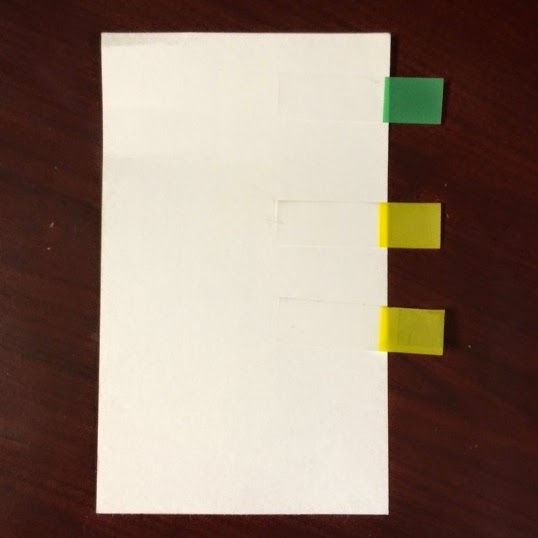
 Being the non-kinder teacher that I am, I was so thankful for the suggestion to give have index cards prepared with one green sticky and two yellow stickies. 
 As the students looked through the books, the put the green sticker on a page where they found the name of the job and the two yellow stickies when they found a tool the person used.
After they placed their stickies, they went and sat on a different part of the rug and the teacher paired them with another student to share what they found.  Most students had time to do 2 books.  

Meanwhile at the computer station, we navigated to four ebooks that our district owns.  These are called Community Helper Mysteries and give clues about the person all the way through the book and then reveal who it is at the end.  


After they listened to 2 books, they came to the table where they glued the cover of the books that they listened to and wrote the name of the person and a tool they used in their research journal (5 half sheets of manilla paper stapled together).

On the next visit, the used iPads to access PebbleGo and listen to one of the community helpers there. Again, in their journals, they wrote the name of the person and two tools they used.  

On the fourth and final visit, they used 30 hands to make a movie of one of the jobs and tools that they researched.  The librarians in our district had previously all found some pictures to put in a file that the students could access for this part.  The students saved the 3 pictures they needed to the ipads and then I walked them through adding the pictures to 30 Hands and how to record.  We modeled the video after the Community Helper Mystery Books.   The students saved their videos to the camera roll and then I loaded them in dropbox for the teachers to access back in the classroom.  

This was a great project for kinder however, as always I wish we had more time.  You'll notice on this video that we forgot to include the source slide.  We talked about citing our sources and how important it is to give credit for where we found our research, but when it came to crunch time we didn't make one to include.  We always seemed to be rushed trying to get 6 or 7 classes in four or five times during the two-week window that our district scope and sequence allows for research.  Wish it could be an ongoing skill through the whole year as interesting things come up instead of a two week chunk of time in their ELA block.