In December, my first graders research transportation, communication and recreation in Colonial Times. You can read about that here. This year, I deceided to kick it up a notch and invite the classes in for time in the makerspace for students to make their own toy. We talked about how in the Colonial Times there were no factories to make toys, no plastic and no batteries. The children had to make toys from what they had on hand. I showed them some of the different materials in our makerspace and then let them have at it. Once again, the creativity the children showed, amazed me.
Showing posts with label makerspace. Show all posts
Monday, December 26, 2016
Tuesday, November 1, 2016
Technology Tuesday: New Makerspace Robots
I feel so far behind in my blogging. So much has been happening in the library this year and I have failed miserably at documenting it. One of the most exciting things is that we have some new robot-y items for our makerspace that the students are LOVING! (Disclaimer: I really had not played with any of these things in depth before putting them into the hands of students. I really have been saying "I have no idea how these things work, y'all will need to figure them out").
Wonder Dash and Dot: I have 6 of the Dash robots and we borrowed 3 of the Dots for a few weeks. The students love Dash because he has wheels and can move. Dot, we don't really understand yet. There are free apps by Wonder that can be downloaded to the ipads to code or control the Dashes. The students at first just want to drive them around and race them, but now they have moved on to coding it to make it do anything. We made some mazes using shower curtains from Dollar Tree and tape.
Even the teachers and principal love playing with Dash.
Sphero SPRK: Similar to Dash in that there are apps you can use to drive or code the sphero, but we had to do some troubleshooting for connectivity for these since they run on bluetooth. I have 4 and students would end up controlling someone else's until I labeled each SPRK with their "name" on the bottom with clear tape. The students like racing these and coding them around the mazes as well.
Cubelets: These are sets of different cubes each cube with a different function. When you put the cubes together something happens. We have been using the cards that come with the set to build so far.
Ozobots: Small robots that are coding from colored lines and dashes. Students have been trying to have the ozobots trace their names in cursive and have been designing tracks for them to run on.
All of these have been really fun additions to our makerspace area. I am excited to see what the students will do with them as the year goes on. Now if I could only find a way to keep them all charged.
Labels:
coding,
cubelets,
dot and dash,
makerspace,
makerspaces,
ozobots,
sphero,
SPRK,
technology,
Technology Tuesday
Monday, October 31, 2016
Maker Monday: Kinder Halloween Makerspaces
When I started the makerspace at my school last year, I started it with 2nd-5th grades (you can read about that here). Thinking there was no way that I could run the makerspace the same way for kinders and 1st graders (if you read this blog consistently, you'll know about my panic attacks before each and every kinder class - haha) I decided I would see how it went the first year and try to figure out a way to give them opportunities the second year.
Well, in May last year, I decided to experiment and see if my kinder teachers wanted to come as a class to the makerspace to try a challenge. You can read "5 Things I Learned From Kinder Makerspace" here. I really liked this format so that is how I wanted to continue this year with them.
I found some Halloween STEM challenges on pinterest that I liked and couldn't narrow down which one I wanted to try so I decided to do 4, one each week in October (I know, I get crazier and crazier). I got the ideas from this blog and this one.
Week 2: Make a monster bookmark (the bookmark folding was direct teach, but then they could decorate however they wanted)
Week 4: Design a Candy Tosser
The teachers and I had so many "Wow" moments watching the students these 4 weeks. Like this student who was using pipe cleaners to hold 4-5 empty boxes together to make his tower for the pumpkin.
And I wish I had video of the last student in the bat video above when he asked me if he could tape a pencil to his bat. When I said yes, his face was priceless. Totally did not believe me and said, "I mean this pencil... can I tape it to my bat?" I said yes again and he still stood there. Hilarious!
While kinders exhaust me, I am always amazed at what they can do, think about, design, invent and make and I am always glad that I give them the opportunity to do those things.
Labels:
challenges,
Halloween,
Kinder,
makerspace,
makerspaces
Friday, May 20, 2016
5 Things I learned from Kinder Makerspace
1. Kinder kids LOVE glue!
2. Kinder kids have great ideas! Yank the red pipe cleaner, the cup moves and the pompom comes out.
3. Kinder kids can make things better! She started with the pompom on the end of the straw, but it kept falling off before she could blow. She looked in the bucket and found the lid to spices that had holes in it. The straw went through the hole and the pompom sat in the lid.
4. Kinder kids can think simple... or complex.
5. EVERY kid can be a maker!
Labels:
Kinder,
makered,
makerspace,
makerspaces,
reflections
Monday, April 18, 2016
Makerspace Still Going Strong
I must say, I really enjoy my makerspace time in the morning. It is really fun to see the students in a loose, creative atmosphere. It is funny to me to see what the kids gravitate towards, sometimes totally not what I expect.
Coding and Duct Tape have been huge hits, as I expected. I do have to figure out a cheaper way to get duct tape though. We went through a ton! I had 4 different projects linked on my libguide: a flower, a ring, bracelets and a bookmark.
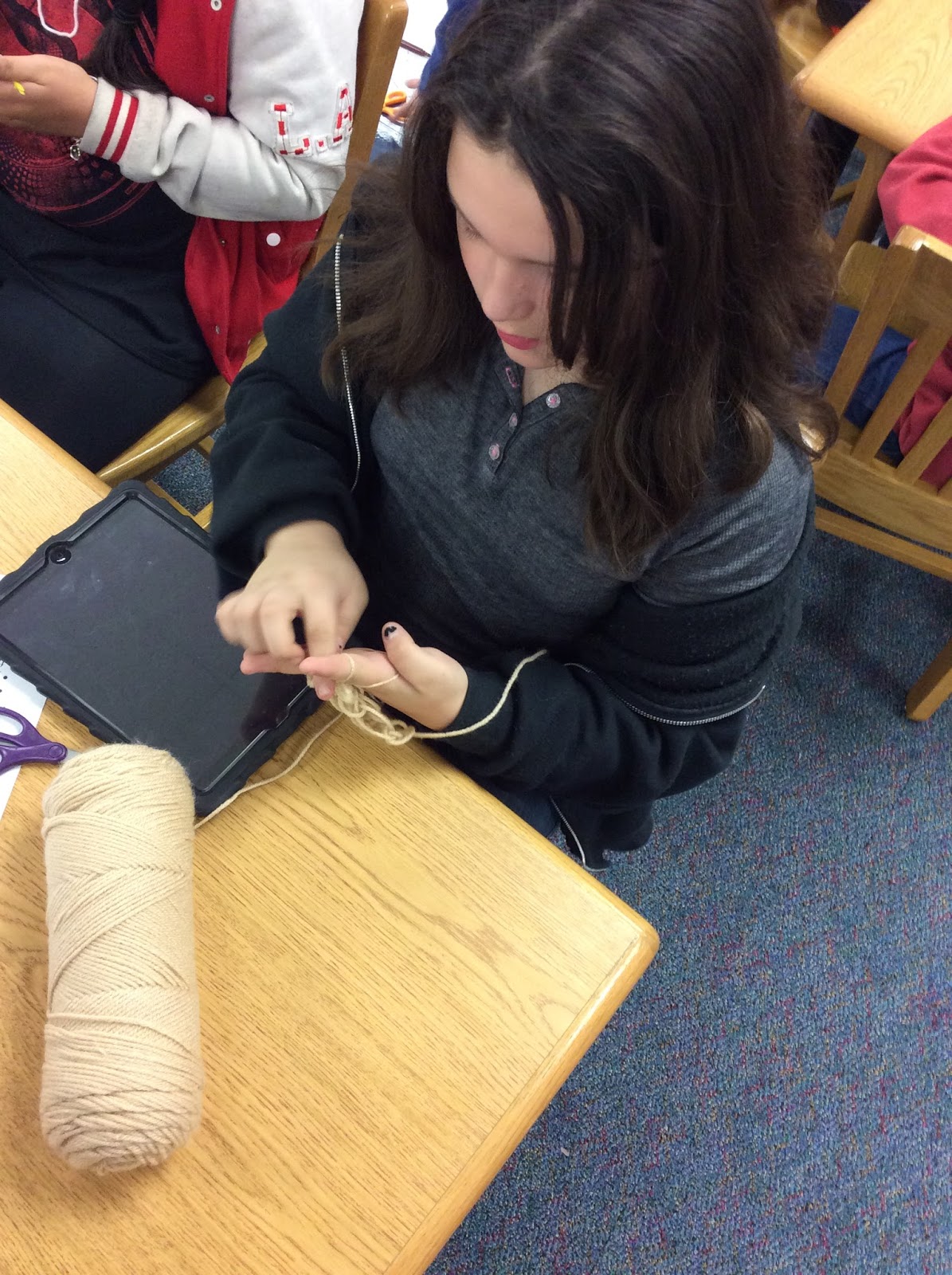
Three activities that surprised me were Finger Knitting, Shadow Puppets and GeoShapes. Finger Knitting took over the school for a while. Kids were bringing their own yarn and knitting at recess. We had modern day knitting circles going on. It was great.
Students also enjoyed making hand shadow puppets. It was fun to see which kids could make the shapes and which needed help and then to see their amazement when they were able to do it.
For geo shapes, I had a sheet with pictures of different 3D shapes and told them they could use any of the materials in the makerspace to make their shapes. Most chose tape and straws, but a few got creative and used pipe cleaners or fabric.
I have one more round of makerspace for the year and I am thinking that I am not going to stick to the STEAM theme as much. I have some different things I want to have in place for next year, so I thought now would be a good time to have them out.
Labels:
duct tape,
finger knitting,
makered,
makerspace,
makerspaces
Tuesday, February 16, 2016
Technology Tuesday: #DLDayRap Challenge
I am a big Jimmy Fallon fan so when I saw this tweet in my feed I had to click on it.
Kasey Bell has some great ideas about how Jimmy Fallon uses games to engage his guest and audiences and that similarly, we could engage our students.
In honor of Digital Learning Day tomorrow, she has thrown out the #DLDayRap challenge -tweet out a rap of your Digital Day Learning with the #DLDayRap. Kasey tweeted out this one...
Inspired by the Grammys, I decided to take a crack at it.
It was better, but when I put it in Twitter it was of course way more than 140 characters, so I had to delete a whole line. I tried again...
I got creative with emojis and abbreviations. And then one more.
Yes, I cheated on this one. I screenshotted it and put it in as a photo because I just couldn't get it down to 150 characters.
This was a fun way to think about a topic and it is definitely difficult to taper down raps to 150 characters, especially when you also have to leave room for the hashtag. I think I am going to add this challenge to my makerspace this week and see what the students can come up with.
Feel free to take Kasey up on the challenge and post your own #DLDayRap to Twitter.
Thursday, February 4, 2016
Teachers Make Too
In my mind, I told myself that it was because they were jealous of the students getting to come to makerspace and learning and playing with new things. We thought it might be fun to have a Teacher Makerspace Faculty Meeting and so that happened yesterday!
At first, I was nervous about it. My teachers, like any other, are strapped for time and have a million things to do. I was a little worried they would think it was a waste of time and not be receptive of the idea. So I did what any good presenter does when faced with having a meeting with teachers...
I brought snacks!
I had a handout waiting on the tables when they came in from dismissal and number 1 said
1. MakerSNACK at the snack bar.
I had put out bowls of cheerios, raisins, chocolate chips, goldfish, nuts and pretzels for them to create a snack of their own (get it... makerSPACE - makerSNACK).
Once everyone had their snack, I put on the projector a list of the 5 activities (one for each of our STEAM areas) with a brief description of each one. I told them briefly about each one and about the materials needed (I had materials set up all around the library) and how to get to the resources on my library page. Then I let them go.
I gave them the choice of
Science - Balancing Act
Technology - Augmented Reality and Stop Motion(I couldn't decide)
Engineering - Pipe Cleaner Challenge
Art - Finger Knitting
Math - Fraction Pictures
There was a lot of chatter and a lot of creating going on. Surprisingly the teachers reactions were similar to students. Some were frustrated with the finger knitting. Some picked it up right away. Some were competitive about building the tallest pipe cleaner tower. Others were trying to make the weirdest structure. Some were very serious about their Stop Motion video. Some were being extremely silly. All were super excited when their augmented reality picture came to life.
And then there were these...
Yep the off-task ones!
There's some in every group, right?
Actually, I very rarely see kids off task when they come to makerspace. But these teachers were creating something... just not what I intended. Maybe they are the G/T ones?
Here are more teachers engaged in the different activities...
| Finger Knitting |
| Augmented Reality |
| More Finger Knitting |
![]() |
| Pipe Cleaner Challenge |
![]() |
| Stop Motion Video |
All in all, I think the teachers enjoyed themselves... a little stress relief goes a long way this time of year.
Labels:
makered,
makerspace,
makerspaces,
teacher makerspace,
teachers
Friday, January 29, 2016
Friday "Wrap Up"
We wrapped up our 2nd round of makerspace this week and I must say, finger knitting by far was the biggest hit. What was most fun was seeing kids the faces of the kids I didn't think would have the patience to learn the process end up making a necklace or bracelet they were so proud of. I wish I had taken more pictures. This is one of my 4th graders who went home and created 4 necklaces after being in the makerspace.
The rest of the week went like this...
- 3 Second grade Fairy Tale Battle introductions
- 5 kinder Storytimes with Rubia and the Three Osos (including one hilarious story time with our ESL kinder class who definitely knew more Spanish than me)
- 4 makerspace sessions
- 1 Fifth grade Virtual Valentine iPad lesson
- Coding Club and Newspaper Club meetings
-1 Bluebonnet Voting Party - Vanishing Coin was our winner
And my nails this week are super cute if I do say so myself - True Love and Tartan
Labels:
Friday Wrap Up,
jamberry,
makerspace,
mani,
manicures,
nail wraps,
nails,
wraps
Monday, January 11, 2016
Makerspace Update
Happy New Year! Where does the time go?
We are in our 3rd round of makerspace activities here and so far things are going well. You might remember, the first time they came to the space we all did the pipe cleaner challenge. You can read about that here. For the second round, they had choices based on STEAM activities (not for every letter though).
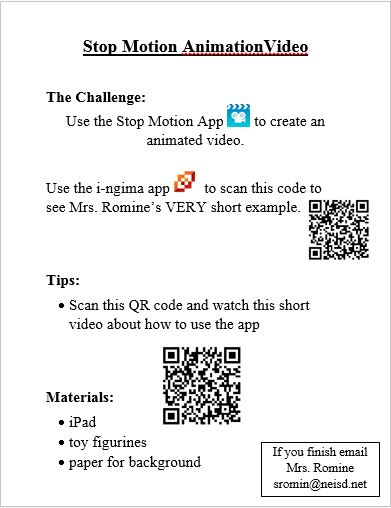
Technology - Stop Motion Animation video
Engineering - Tennis Ball Tower
Art - Origami
I have task cards for each of the activities but still have to do some explaining when all the students arrive. Here is an example of the task card for the Tennis Ball Tower (I got the tennis ball tower idea from this blog which I found on Pinterest)
The kids are loving the makerspace so much and have asked how they can do this stuff at home so I put links to the activities on my libguide so they can access the videos and directions at home.
The one thing I am still struggling with is getting them to stop and clean up when it is time. It is a disaster when they leave some times!
We are in our 3rd round of makerspace activities here and so far things are going well. You might remember, the first time they came to the space we all did the pipe cleaner challenge. You can read about that here. For the second round, they had choices based on STEAM activities (not for every letter though).
Technology - Stop Motion Animation video
Engineering - Tennis Ball Tower
Art - Origami
I have task cards for each of the activities but still have to do some explaining when all the students arrive. Here is an example of the task card for the Tennis Ball Tower (I got the tennis ball tower idea from this blog which I found on Pinterest)
Some of the task cards have QR code links to how-to-videos like the Stop Motion Animation task card.
This was really an eye-opening station for me to see how creative the students were. Some just took off with it. Here is an example of one some 5th grade girls made.
For origami, I printed out and laminated pages from this website . These directions with the pictures were pretty easy to follow. However, for the 2nd graders, I recorded myself making 3 things and then put a QR code to the video so they could follow along that way. It worked better for the younger ones than the written directions.
The kids are loving the makerspace so much and have asked how they can do this stuff at home so I put links to the activities on my libguide so they can access the videos and directions at home.
The one thing I am still struggling with is getting them to stop and clean up when it is time. It is a disaster when they leave some times!
Labels:
challenges,
makered,
makerspace,
origami,
STEAM,
stop motion
Friday, November 6, 2015
Friday "Wrap Up"
It was early dismissal this week for parent-teacher conferences. I typically don't schedule my regular 1st and 2nd grade lessons this week because the schedules are so screwy and it gives me a chance to do some special lessons or work on projects if I need to. One of those projects was to rearrange the space where I was holding makerspace. My original space was not big enough and did not flow right for me. When our director came we talked about shifting my fiction section and using that space. So I did.
So I rearranged my fiction area so that the makerspace was near the tables in my teaching area and there is lots of floor space for those that like to spread out.
![]() |
| This was originally where I was going to have my makerspace. It just wasn't working right. |
![]() |
| This was my fiction section before. |
- 5 Kinder Storytimes
- worked on makerspace activities
- rearranged makerspace area
- planned STAARy Night Parent eBook Session
And my nails from last week are still going strong so here are some Thanksgiving Wraps. Gobble Gobble
Labels:
Friday Wrap Up,
jamberry,
makerspace,
mani,
manicure,
manicures,
manis,
nail wraps,
nailart,
nails,
Thanksgiving,
transformation,
wraps
Subscribe to:
Posts (Atom)