Showing posts with label 1st grade. Show all posts

Wednesday, September 1, 2021

Odd One Out

Do you remember the song from Sesame Street called "One of These Things?" 

I had forgotten about it until I had some training on Lead4Ward strategies. These are instructional strategies that are designed to engage students, encourage interaction and allow the teacher to see and hear the thinking of the students.  One of the strategies is called Odd One Out  and is basically one of these things is not like the other. 

Basically, you give students 4 visuals, words or texts to determine which one is the odd one out and justify their thinking. 

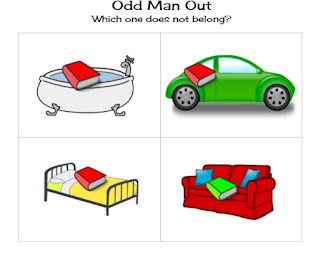
I recently used this for my Library Orientation with 1st and 2nd graders.  I showed them 4 pictures relating to books, reading or book care and asked them to turn and talk to decide which one didn't belong. Then we shared with the group.  The conversations were spot on and super engaging for the students and some of their thinking really surprised me.  For example when I showed them these pictures 
I was looking for you can read in all the places EXCEPT the bathtub, which most groups came up with. But I did have one group say the couch was the wrong one because the book was green (which I didn't even notice until they said it lol) and another group say the car was wrong because the book would fall off of that.  Maybe those were not the right answers, but the students were able to justify their thinking so I call that a win!  

I plan to use this more often in the future. The only problem I have found is that I usually end up singing the "One of These Things is Not Like the Other" song for the rest of the day. 


Sunday, November 18, 2018

Elephant and Piggie Speech Bubbles

At the beginning of year, I sat with our 1st grade teachers in a meeting with the reading specialist assigned to our campus as she talked with them about reading and writing.  One of the things she mentioned was noticing how authors used different things in their writing and then encouraging the students to try it in their own writing. I decided that I could do that in the library.  I read a few of Mo Willems Elephant and Piggie books to them and we talked about how he used speech bubbles to show what Gerald and Piggie were thinking and saying.  Then they went to a template I had uploaded in Seesaw for them. We looked at the pictures in the frames and talked about how the speech bubbles. 
Students then went to work adding in the dialog.  

Most of the students recreated the banana joke from the story We Are In A Book like this student did 


However, one clever little guy really understood the idea of a joke and came up with this (his teacher did help him with spelling).  The video is only 13 seconds long, he doesn't press stop though which is why it keeps recording.  Oops.


Don't you love that??

Tuesday, January 24, 2017

Technology Tuesday: Strip Designer Clock Selfies

My 1st graders have been doing time to the hour and half hour so for our lesson this week, I decided to read one of my favorite books Scaredy Squirrel and do an ipad lesson.


There's just something you have to love about Scaredy Squirrel, his schedule and his fears of the unknown.  After reading we made a list of their schedule and what they were doing at different times of the day.  Then in strip designer we set to work.  


The students loved taking selfies and adding the speech bubbles to their work.  I printed them out for the teacher and she hung them in a timeline in the classroom.  

Monday, December 26, 2016

Maker Monday: 1st Grade Make Toys

In December, my first graders research transportation, communication and recreation in Colonial Times.  You can read about that here.  This year, I deceided to kick it up a notch and invite the classes in for time in the makerspace for students to make their own toy.  We talked about how in the Colonial Times there were no factories to make toys, no plastic and no batteries.  The children had to make toys from what they had on hand.  I showed them some of the different materials in our makerspace and then let them have at it.  Once again, the creativity the children showed, amazed me.


Thursday, April 28, 2016

Poetry Month

I was at a loss as to what to do with K-2 during poetry month this year.  Luckily, the librarians in my district are so willing to share ideas.  Here is what I ended up doing with them.

Kinder:  "A Rainbow is..."  from The Bubbly Blonde Teacher blog.  I read My Many Colored Days by Dr. Seuss and then the kinders filled out the rainbow poem.
Of course, we had the standard answers... red as an apple, blue as water.  But we had some pretty creative ones also... purple as a plum, orange as a sunset, green as a lizard.  And I always love when they ask how to spell orange and I say it is right there on your paper and they say, "No, the orange that you eat".  They are amazed that the color and the food are spelled the same :)

1st Grade:  "Ouch" Poem from the First Grade W.O.W. blog.  I read about 6 of my favorite poems from Shel Silverstein's Where the Sidewalk Ends.  And then read the "Band-Aid" and "Sick" poems. We brainstormed a list of ways we can get hurt and then the wrote their poems.  I found some Minion Band-aids at the Dollar Store and gave those to the kids when they finished their poem.  
I love that this one started to rhyme and then gave up.


2nd Grade:  Shape Poems on the ipad using  Theme Poem app and Tagul website.

And we finished off the month participating in Poem in Your Pocket Day today.  


Wednesday, October 7, 2015

Technology Tuesday: Popplet

First grade is learning about things in the sky.  We used Pebble Go and Popplet to make a web of 2 things they can find in the sky.

Popplet was a little challenging since anytime you touch a new popple comes up but the students enjoyed it and hopefully the teachers will start to use it more in the classroom.  

Wednesday, September 23, 2015

Technology Tuesday: Chatterkids Digital Citizenship

Every year, teachers in my district have to teach 4 district provided lessons in September about Digital Citizenship.  The 4th lesson is about copyright and so it makes sense that the librarian teaches that one.  Copyright is an especially hard concept to teach to the younger grades out of the blue.  I think they understand it more when we revisit it with our research units in the spring.

Anyway, this week we are doing the district provided videos, but I decided to kick it up a notch and add a fun app called ChatterPix Kid to the mix.  
This is a fun app that makes anything talk.  All you have to do is take a picture, draw a mouth and record.  After watching the district copyright video and discussing why it is not ok to take someone's work without giving them credit, I had the students get iPads and create a video explaining it in their own word.  The took a picture of a book cover or a computer, recorded their explanation and then I allowed them to add stickers to their video.  What fun!


Tuesday, March 3, 2015

Technology Tuesday: Skyping with Maryland

So last week, I wrote about how one of my students skyped with a few students from Maine. (read here).  Today, after rescheduling from a Maryland snow day yesterday, a whole class was able to skype with another class in Maryland for World Read Aloud Day.

I first heard about World Read Aloud day on twitter.  I asked a few questions and a very nice librarian in Maryland named Mr. Winner answered my questions and volunteered to show me the ropes if I signed up on his schedule.


He sent me the link to the google doc and you notice he is on p. 65.  Yes, it goes on and on, teachers and librarians everywhere looking for schools to connect with for World Read Aloud Day (or Week). 
Mr. Winner and I  discussed via twitter which book we would like to read and  thought we were all set, until Mother Nature got in the way and cause a snow day in Maryland yesterday.  

Lucky for me, Mr. Winner had a cancellation for today and we were able to connect anyway.  He had a 2nd grade class and I had a 1st grade class.  After walking me though a camera glitch, we were finally connected!  One of his sweet 2nd graders introduced themselves and told us a little about their school and then we did the same.  We had decided that we would partner read Shh, We Have a Plan by Chris Haughton.  He read a page and then I read a page.  
    

Then his 2nd graders took turns each reading a page of Hug Machine  by Scott Campbell.  We still had a few minutes so one of his students asked us a question and then we asked them a question. 

We said our "good-byes" and "thank-yous" and disconnected.  

Afterwards, the kids were full of questions about Maryland.  I pulled a map up on the computer and showed them how far it was from Texas.  Earlier in the year, we had talked about communication in the Colonial Times.  That was a great thing to bring up again to talk about how that connecting like we did would not have been possible back then and that people had to wait weeks or months to exchange letters and news and here we did it instantly.  

I am so excited to connect some more and see how my teachers might take an interest in this.  I know I am late to the skyping bandwagon, but I love the possibilities of connecting kids to other kids to talk about geography, parts of the world, books, research... the list is endless.   


Tuesday, February 10, 2015

Technology Tuesday: Nonstandard Measurement

Don't you just love it when you have an idea and after a couple of fails, you figure out how to do it?(sort of)  When my first graders study nonstandard measurement, I like to read them Leo Lionni's Inch by Inch.
In the past, I had pictures of the animals in the book and "inchworm" rulers for them to measure with. This year though, I wanted to try to amp it up a bit with the iPads.  I wanted them to use stickers of some kind to measure a picture.  I started off with the Doodle Buddy app, thinking they could draw the picture and then use the stamps provided in the app to measure.  The problem I ran into with this app was that I could not figure out how to move the stamps once I put them on the page.

Plan B:  Try it in my old, trusty, go-to PicCollage. 
Are there stamps?  No, but there are "stickers". 
Could I move them?  Yes and resize them!  
Could I copy them once I had a good size?  Yes, by double tapping on the sticker.  

So after reading the book.  I had the kids take pictures of each other from head to toe.  Then I walked them through getting their picture into PicCollage and showed them the features of the stickers.  For an added bonus, I had them add text.  Here are a few of the finished products.  

Are they perfect? No, but the kids got the idea that the stickers had to be stacked end to end and don't you love that Penny is 3 and a half arrows tall?  

How have you made a paper/pencil activity iPadable?

Friday, January 23, 2015

Friday "Wrap" Up

This week was a little calmer without 3rd grade research days taking up my week.  I did get back to seeing my K-2 classes this week.

1st grade Bark George/ 30 hands sequencing lessons
Introduced 2nd grade Fairy Tale Battle
Met with a middle school librarian to plan a genre-fying PD
Helped student council with the New Year's Neon Dance
Went to dinner with Author/Illustrator duo Kate and Sarah Klise and networked with other librarians
Exercized 4 times!

And my Jamberry wrap of the week... Love Spell.  Perfect for Valentine's Day!


Tuesday, January 20, 2015

Technology Tuesday: 30 Hands

Have you heard of the 30 Hands App?

 I hadn't until last Monday at our Elementary Library meeting and boy have I been missing out.  It is an app similar to Educreations or ShowMe in the fact that you can upload pictures and then record. You can also write or add shapes to the pictures (haven't played with that very much).  But what I love about it is that each slide is its own recoding.  If you mess up, you don't have to start back at the beginning like some of the others.  That feature alone makes it a great tool for the younger kids but even better than that it is really easy to use.

Today, I used it with 1st graders for seqencing the story Bark George by Jules Feiffer
If you haven't read this book, you must!  It is a great story for sequencing, but is so silly. Kids of all ages love it (I sometimes even catch the teachers giggling).  Anyway, normally I have them sequence the story on paper, but after hearing about this app I knew I must try it.

I started off ahead of time by taking some pictures from the book with my iPad and then had to figure out how to get the pictures to all my student ipads.  I was going back and forth between Chirp and Dropbox and since I hadn't used Chirp before decided to go with Dropbox (probably a little more time consuming, but at least I knew what I was doing).  So I uploaded the pictures into Dropbox and then had to download them into the camera roll of the 11 ipads I was going to use.  (I decided to have the students work with partners)  I am sure there is an easier way to do this and would love to hear any suggestions in the comments below.  

Then when the class came in, I read them the story and we talked about the meaning of sequencing. They got their iPads and I walked them through getting the pictures into 30 Hands.  I made sure that the pictures were not in order on the camera roll so they were also out of order when dropped into 30 Hands.  

I showed them how to rearrange the pictures and record and then off they went...  They had to talk to their partner about the order of the pictures, move them and then record their retelling of the story.  

Here are 2 examples from our class today.  I love how one is short and to the point and the other is a little more wordy.  We have not spent much time recording in first grade, so there are some pauses, hesitations and talking between the partners, but over all I was pleased with all of the kids' work.  


Have you used 30 Hands before?  What apps do you like for retelling?


Thursday, December 18, 2014

Transportation, Recreation and Communication

This year, thanks to our wonderful District Library Instructional Coordinator and her love of social studies, our 1st grade research unit was kicked up a notch.  I blogged about this research project last year here.  The kids and teachers liked it, but this year was so much more fun.

The unit was designed as a Guided Inquiry project so we started off with by talking about the students.  How old they were, what was considered the past, the present and the future for them.  We used a strip of 10 blocks and had them number up to their current age (the present).  Anything before that was the past and anything after that was the future.  Then we glued that into a paper journal I had made.  The 10 strip was a great visual for them and I really think it helped to cement the concept. 

 They were shocked when I brought out my timeline and showed them all 42 of my squares.  You would think I was 110!  We talked about how my past is longer than theirs because I am older.  They of course wanted to know when on the timeline I was in 1st grade and when I became a librarian, etc.  
Then I showed them Discovery Education Boards that my assistant and I each had made about what transportation, recreation and communication was like when we were in first grade.  
I loved this because we could put our own pictures, or find some on the web and we could use a recording app on the ipad to read our writing and embedded that on the board to read to them also.  My assistant is 10 years older than I am so it was interesting for them to see the difference in that short amount of time.  

In the next lesson, I had picture cards for each group of pictures of communication, transportation and recreation items.  I told the kids they needed to sort the 12 cards into 3 groups.  They did need some guidance for that but once they got one of the groups, the could go from there.  Then I read them the book Hornbook and Inkwells by Verla Kay
and we talked about the different transportation, communication and recreation items that we saw in the book.  We took notes about the book in our journals.  

For the 3rd lesson, our district library services had bought each of us some items for the kids to explore with.  I had a slate and chalk, quill and ink(feathers and black tempra paint), clay to make marbles, ABC dice, wood dice with numbers, a ball and cup toy, a buzz saw and spinning tops.  The kids really enjoyed the hands on opportunity to get to use things.  More than once I heard from the quill ink station, "Boy am I glad we have pencils now!  This is hard!"  


For the final lesson, we took a lot at Pebble-go Social Studies and took some more notes on the Colonial Times and Now.  Then the students had to write a sentence or two in their journals about what they had learned.  Then they used the iPad to take a picture of an item that went with their sentence and then narrate the picture in the educreations app.  


I am so glad that we were able to have so much fun with this research.  It is a crazy time of year though and trying to fit this in right now with all the "other" stuff going on was a bit challenging, but I think the kids enjoyed it and have a better understanding of communication, recreation and transportation in the past.

Tuesday, October 7, 2014

Technology Tuesday: TinkaMaker and ChatterPixKids

We are so excited about our Kate Klise visit coming up in November! Today with First Grade I read her book Little Rabbit and the Meanest Mother on Earth.
Before the story, we predicted why she could be the "meanest mother on earth".  After the story, the students completed the sentence My mom is the meanest mom when she....  Then on the iPad we used the app TinkaMaker 

TinkaMaker
to create what our meanest mother looks like.  The kids had a great time adding wild hair, different shaped heads and ears and experimenting with different eyes and mouths to make her look mean.  
We took screen shots of our creations (that was exciting with first graders) and then opened the ChatterPixKid app.
ChatterPixKids
Here we were able to take our meanest mother picture, add a mouth and record our sentence.  


Both of these apps are free and tons of fun to use by themselves, but put them together and watch what happens.


Tuesday, December 10, 2013

Technology Tuesday: Long Ago and Today

In first grade this week, we are researching how communication, transportation and recreation have changed over time.  We are using books and PebbleGo to find our information.  We split up into 2 groups.  One goes with the teacher to look at the book and one goes with me to look at PebbleGo and then we switch.  After the students have seen both and taken notes, they write a sentence telling how people traveled long ago and then how people travel today.  Then they used the Super Duper StoryMaker app on the ipad to create a picture.

I emailed the picture to myself and then used Scribble Press to put a book together.  
I have 6 first grades so 2 classes will research transportation, 2 communication, and 2 recreation.  Then we are going to share the Scribble Press books either through the website or the teachers can load the books onto iBooks on their ipads for the students to look at during station work.  Here is one of our finished books.  
The only thing that I didn't like about mashing these two apps was that StoryMaker can only be done as a landscape picture and Scribble Press only in portrait.  That is why the pictures only take up the middle of the page.

(I promise I do technology with the other grades, I just see 1st grade more than the others.  I will have other grade levels'work after the new year.)

What book makers do you use?


Everybody Folders? (I really don't have a name for these)

During my first year in the library, 10 years ago, I think the students had a master plan to see how many time they could stump me.  You know when they want a "Monster" book or a "Princess" book.  And you know they mean a story from the Everybody section, but of course the "Monster" books and "Princess" books are all over the place.  So you have a few go-to's but since those are the go-to's they are pretty much never on the shelf because you point them out all the time.  Well, coming up with the folders saved my bacon (and my sanity).

I went through my catalog in search of "Monster" Everybody books.  I copied the cover image into a table in a Word document, added the title and call number

Then I glued them into a file folder, added a cover to the front and laminated them.

Volia!  Problem solved.  The kids go to the bucket that I keep them in (I made about 10 different folders on popular topics... cats, dogs, princesses, sports, horses, different holidays, dinosaurs, etc.) and choose the folder they want to look at.  They look at the covers and decide which book they want and then they can show me which one they wan,t or better yet, when they get to 1st and 2nd grade and we have talked about how the Everybody section is organized, they can go find the book themselves.  The only problem is that sometimes the book is not there (because this is the new go-to list), but at least then there are plenty more to choose from.  

What shortcuts have you found to help kids find books?

Tuesday, November 19, 2013

Technology Tuesday: Visual Poet

I was looking for something different to do with my first graders last week and came across the Visual Poet app.
In science, they were studying water, so we looked on our PebbleGo database and researched the different kinds of bodies of water and what animals live in those areas.  PebbleGo has information on lakes, rivers and oceans so we looked at those pages and the students wrote down the definition of the word and at least 3 animals that live there.  Then we used visual poet to put it all together. 
I love that in this app you can search for pictures right in the app.  Made it really easy for first graders to find a picture.  I can't wait to find other uses for this app.  What could you see using Visual Poet for?

Tuesday, November 5, 2013

Technology Tuesday: 1st Grade Then and Now Video


Last year my first graders researched how communication, recreation and transportation has changed over time.  I had 6 first grades and this was in December so we decided to make it more manageable instead of each class researching all 3 areas, 2 classes would do transportation, 2 communication and 2 recreation.  Then we would combine them into a video that the whole grade level could watch.

We had the kids draw a picture of then and now and then the teachers picked a few from each class to feature in the video.  I used Photostory to make the video and the kids loved coming in and recording a sentence about their picture.  


This year I want to try to kick it up a notch and maybe try using scribble press to make each class an ebook that they can then share.  Have any of you used scribble press or another ebook creator?  Please comment below.  

Saturday, October 26, 2013

Hallo-Wiener

I found this Hallo-wiener idea on The Teacher Geek and adapted it for my first graders who were studying character feelings.  We first read the book The Hallo-wiener by Dav Pilkey
 and I told the kids to watch and listen for how Oscar feels during the story.  After we read, we made a list of the feelings Oscar had and when he felt that way in the story.  Then I sent them to work.  
They each got a piece of manila paper for a bun, brown paper for Oscar and a few tracing dogs for the table (I do round the corners of the bun and cut the brown paper ahead of time).

They trace the dog, cut him out and glue him to the inside of the bun.  I love how some decided to put on ketchup and mustard and give Oscar a face and ears  J  Then they choose one of the feeling words to write on Oscar’s belly and write the text evidence on the inside of the bun.  They turned out really cute.


Some of Mrs. Brown’s first graders showing off their Wiener Dogs.