Showing posts with label lesson. Show all posts

Tuesday, May 19, 2015

Technology Tuesday: Nearpod

I attended a session about Nearpod at TCEA this year and I know a few of our librarians LOVE it, but I hadn't been brave enough to try it until now.
Nearpod is an interactive presentation tool.  It keeps the students engaged as the teacher controls the lesson from their computer or iPad.  The teacher can push out content, activities, questions, polls and quizzes to each iPad.  There are many already created nearpod lessons or you can customize your own.  

I decided to try this with kinder this week since they were still coming for a story, but not checking out, we had some extra time to try it.  I created a very simple lesson about plants to complete after we read a book about plants.  I chose From Seed to Plant by Gail Gibbons for our story.

After we read, I passed out the iPads (one iPad for 2 students).  I was projecting my iPad and controlling the lesson from my computer because I wanted to be able to model the different activities since we were doing it for the first time.  The first thing they had to do was type in the lesson code and then their names.  On my computer screen I could see as they entered their names.  Then I clicked to turn the page on my computer which in turn changed the page on their iPads.  Since we read the book first, I did not include any content in this first lesson.  Each of the 4 pages was an activity.  I included a fill in the blank activity of plant parts for the first page.  
An open ended question, "What do plants need to grow?" was the second page.  The third page was an image I created in PowerPoint and saved as a jpg.  
And the final page was to draw and label the parts of a flower.  

The students really enjoyed using this app and I thought it was perfect for immediate feedback since their submitted answers popped right up on my screen.  


Here are some of the things I loved about this.  I controlled the pace. After each activity when students submitted their answer a "Thank You" screen popped up and they could not go ahead or back until I advanced it.  I also liked being able to see who had submitted and who had not submitted as well as their answers. I loved that there were so many ways to assess... fill-in-the-black, quizzes, polls, drawings, short answer, etc.  I will definitely be using this more next year.  


Tuesday, October 28, 2014

Technology Tuesday: We are Illustrators

In kinder we have been talking about authors and illustrators for a few weeks now.  Last week, we read the book It's a Tiger by David LaRochelle.  
The students love calling out "It's a Tiger!" whenever the boy sees something that doesn't belong.  I love the illustrations in this book and after checking out Jeremy Tankard's website and how he uses ink and digital media to create his illustrations, I found the perfect app to try and replicate his technique.  So after we read the book last week and talked about the illustrations, I told the students that we were going to be illustrators like Jeremy Tankard but it was going to be a two-week process.  First we had to draw a tiger in our Library Journals (read more about my kinder journals here).  I found a step-by step guide to drawing a tiger and then using my airliner slate, I drew on the screnn while the students followed along.  Now, remember these are kindergartners so there was a wide range of tigers 


but as long as they tried, we were OK with what they drew.  

So this week, we reviewed how Jeremy Tankard illustrates and then they found their tiger drawing in the journal.  We then opened the Crayola Lights, Camera, Color  app.  
I was projecting my iPad onto the screen, so the students followed along as we started a new picture and then took a picture of our tiger.  The classroom teacher and I went around and helped the kids who needed help holding the iPad and taking the picture.  Then the app has a "vacuum" tool that sucks the color out of the picture and leaves an outline (our pictures didn't have any color on them but you have to do this step to go on).
Then the fun begins.  After you click the orange arrow and get past the stickers, a marker wheel appears at the bottom of the screen.  Students choose a color and with their finger color their illustration.  
Again, there was a wide variety of coloring, but I was going the experience ;)

All in all, I was please with the lesson and using the iPads with kinders this early in the school year.  And they loved being illustrators!


Tuesday, September 16, 2014

Dot Day

I love my teachers... they are always willing to try something new or play along with my ideas even when in true Mrs. Romine fashion, I spring it on them.  This year I heard about Dot Day for the first time.  And so two weeks ago, I sent out an email telling the teachers about International Dot Day with a link to this blog  with some ideas and said if anyone was up for doing an activity to let me know.  Some teachers took it and ran with it, planning activities to do in the classrooms, like these kinder teachers.  For math, they read 10 Black Dots and gave each kid a different number card.  They had to tell the teacher the number and count out the number of dots to make their picture.
a snowman

a car
In Language Arts, they happen to be studying beginning sounds, so the kinder idea from the blog above went perfectly.  Students had a paper with the first initial of their name and had to put dots all on the letter.

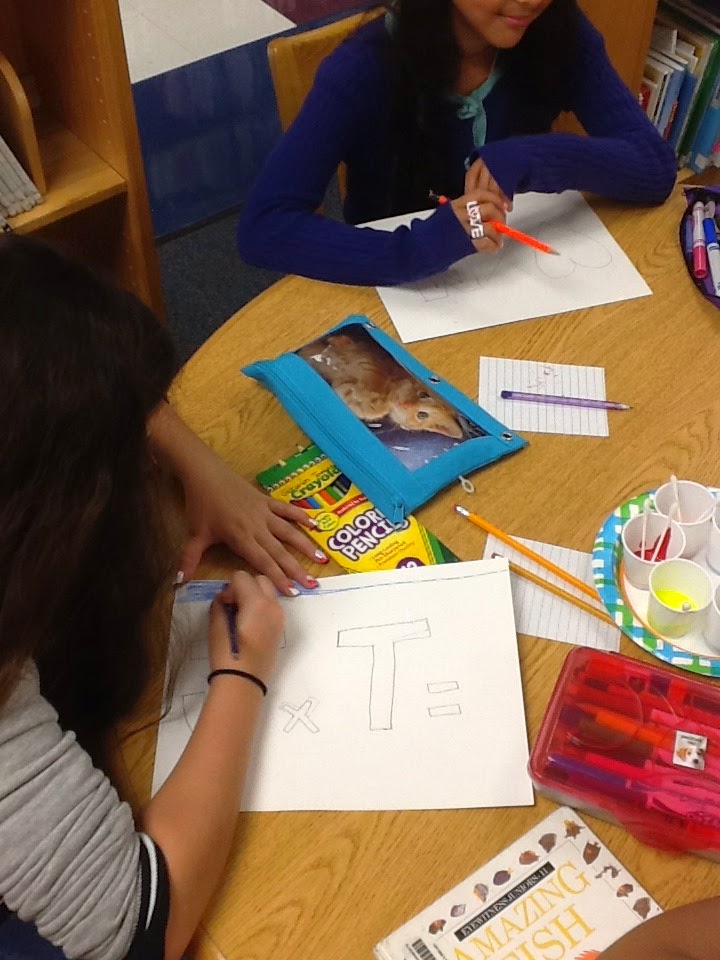
My 5th grade teachers departmentalize and one of the math teachers and I collaborated on how to use dots with their objective of two-digit multiplication.  We decided to have the kids make a drawing of two shapes.  It could be abstract shapes, geometrical shapes or 2 "things" that go together.  Some even did their initials. 
Then they had to color around the shapes for their background.  When they finished that, they took a Q-tip with paint and dotted the inside of their 2 shapes.  Then they counted the number of dots in each shape and wrote a multiplication sentence and solved the problem.  Then they made a QR code on the iPad with the answer to the problem. 
Finally they attached the QR code to their drawing and signed their picture.  
Now the pictures are ready to be hung in the 5th grade hallway for a self checking multiplication station.  


Tuesday, December 10, 2013

Technology Tuesday: Long Ago and Today

In first grade this week, we are researching how communication, transportation and recreation have changed over time.  We are using books and PebbleGo to find our information.  We split up into 2 groups.  One goes with the teacher to look at the book and one goes with me to look at PebbleGo and then we switch.  After the students have seen both and taken notes, they write a sentence telling how people traveled long ago and then how people travel today.  Then they used the Super Duper StoryMaker app on the ipad to create a picture.

I emailed the picture to myself and then used Scribble Press to put a book together.  
I have 6 first grades so 2 classes will research transportation, 2 communication, and 2 recreation.  Then we are going to share the Scribble Press books either through the website or the teachers can load the books onto iBooks on their ipads for the students to look at during station work.  Here is one of our finished books.  
The only thing that I didn't like about mashing these two apps was that StoryMaker can only be done as a landscape picture and Scribble Press only in portrait.  That is why the pictures only take up the middle of the page.

(I promise I do technology with the other grades, I just see 1st grade more than the others.  I will have other grade levels'work after the new year.)

What book makers do you use?


Monday, November 18, 2013

Why, Oh Why Can't They Remember

Every year I teach 1st and 2nd graders how the Everybody section is organized and every year my 3rd, 4th and 5th graders act like they have never heard that the Everybody (and Fiction) sections are organized in alphabetical order by the first three letters of the author's last name.  I have two different activities for 1st and 2nd grade and in both lessons, they can find an Everybody call number that I give them.

In first grade, we read the book Elsworth's Electrical Ears, a cute alphabetical book of alliterations.  While we are reading I ask if they notice anything about the book and someone always comes up with that it is in ABC order.  After the book, I ask them if they notice anything about the Everybody section and someone always notices that the wooden letters I have attached to the shelves are in ABC order.  Then I talk about how the library is like a little city and we have different neighborhoods and if a friend asked you to come over and play, what would your mom need to know to get you to the house?  They say the address. Then I explain to them that each book in the library has an address or call number that tells us where the book "lives" in the library.  When an author write a picture book, then it lives in the Everybody "neighborhood" on the "street" of the first letter of the last name.  I tell them that if I wrote a book, my book would live on "R" street at the address "ROM" and I go stand at the Rs.  I ask them to think about their last name and to go sit in front of the shelf where their book would live if they wrote one.  Then I say the whole alphabet and tell them to stand up when I say their letter so they can see all the way around the shelves A-Z.  Then I give each partner group an index card with an address on it like E PAT, E MUN, etc. and tell them to find that address and raise their hand when they do.  I give them about 3-4 different cards depending on the time.  And low and behold, they are mostly successful.

In second grade I start with the story Alpha-Betti.  A story about a girl who finds out that it is easier to find things when they are organized in alphabetical order.  I remind them about the lesson we did in first grade and how the Everybody neighborhood is organized by the author's last name.  We then go to the tables and play a game called "Sticks and Stones" that I got from the book Stretch Library Lessons.
In this activity, they have stones with letters on them and sticks with author's names.  They have to arrange the stones in order first and then the sticks and if their are two names that have the same letters, they have to look at the second and third etc.  When they are all finished, I give each person a stick that has a call number on it, similar to the index cards from 1st grade, except this time they are working alone and I tell them we are going to see how many they can find in a certain amount of time.  When they find the first one, they raise their hand and the teacher and I go around, check that they found the right spot and give them a new stick.  

They think it is SO fun to find books this way and love to see how many they can find in the given amount of time.  Afterwards, we gather back together and I tell them that they are becoming better library users and can now start finding books on their own.  If they ask me where a "No David" book is and I tell them SHA, they should be able to go there and find the books.  Then I make them raise their right hand and repeat after me..."I am a library user.  I know the Everybody books are organized in alphabetical order by the author's last name.  I can find books in the Everybody section by myself.  I will NOT forget how to do this when I am in third grade"(that's when they giggle).  I tell them that something must happen to the brains of 2nd graders over the summer because every year I teach this same lesson and every year the second graders know how to do it and every year, the third graders look at me like I am crazy when I tell them to find something.  They assure me that this will not happen to them and they WILL remember.  They are so excited about this and for the rest of 2nd grade, they quiz me about where different favorite books are and I love to see how proud they are when they find them.  Then they become 3rd graders... and look at me like I am crazy... but this year I have proof... I have pictures! 

Wednesday, November 13, 2013

Technology Tuesday: Flipping the Library

Well, we did it!  One of my awesome librarian friends and I created a plan for flipping some 5th grade research mini-lessons.  In our district's ELA scope and sequence, 5th grade does their research project in late April.  I have always hated waiting until the day(s) they come in to "explain" and take them through the whole process.  I started these research mini-lessons with 3rd grade a few years ago and it seems to work really well.  They come in a few times before the big research time and we hit the research process in small chunks.  So we decided to try it with 5th grade but in a flipping format.  To start, we thought out the chunks of the process that we wanted to focus on.  We decided that our first lesson would target formulating questions and finding key words within the questions. We made a video using the screencasto'matic website and a short accountability worksheet for them to record some information from the video as they watched it.  I then uploaded it to my library page.  A few days before I did the lesson with each class, I went in and told them about the idea of flipping the lesson - that they would be doing the "listening" part at home and the "doing" part at school where they could get help if they needed it. I also showed them how to navigate to the video and gave them the worksheet.  I had already talked to the teachers and we had a plan for those kids that didn't have internet access at home for them to come to the library before school one day and watch it.
When the came to the library for their scheduled lesson, about 75% of the kids had actually completed the worksheet (that actually surprised me, I thought it would be lower).  We talked through the worksheet where they had to pick out a few key words from the TEKS in the video and then formulate three questions based on the TEKS (talking through this gave the kids who didn't complete the sheet a chance to write something down).  Then I showed them another quick video to remind them how to search in our library catalog.  
I assigned each set of two kids one of the 13 colonies.  They had to choose one of their questions, find a book in the library catalog about that book, go get the book and by looking at the table of contents and index predict some pages they might find the answer on.  Then they actually tried to find the answer.

All in all, it went REALLY well.  Most of the kids were successful and when we finished I asked them what they thought about the flipping idea.  "It was fun."  "More interesting than just listening to you talk and tell us how to do it" and "It was a different way to learn" were a few of the comments.  I asked them then if they thought the idea of flipping would work in other subjects and they said math and science for sure.  As we were talking about that, one student even said, "I think it would be good in math because then if we didn't understand we could watch the video again!" BINGO.  Best of all the teachers were so intrigued by the lesson and the kids comments that they are toying with the kids of flipping a fraction lesson next week!  Total success in my book and I can't wait to try the next one in February.  

Have you tried flipping a library lesson? What other types of library related lessons do you think could flip?  


Monday, November 4, 2013

Kinder in the Library

I think there is a special place in heaven for Kinder teachers.  I once saw a sign at a craft show that said "Teaching kindergarten is like trying to herd grasshoppers".  I would be lying if I said that I didn't have a little panic attack right before each of my 6 kinder classes come into the library every week.  I see them once a week for 30 minutes which includes story time and checkout.  I hate to admit this but when I first became a librarian, 5 minutes before my first kinder class came for the week, I would look quickly around the library and chose a book at random to read to them.  There was no rhyme or reason to what I picked.  It was just something to get me through those 15 minutes.  I am happy to say that I no longer do that.  Thanks to one of the other librarians in my district that I was mentoring one year (however I think I actually got more from her than she got from me).  She was new to our district but had been a librarian way longer than I had.  She showed me the journals that she does with some of her grade levels and something clicked for me.  I could do this with Kinder!  Each one of my kinder students has "My Library ABC Journal".  It is a journal from A to Z with a book and activity for each letter.  It stays in the library all year long.  Each week we do a letter in the journal and at the end of the year they get to take it home to remember all the great books we read that year.  They really enjoy seeing how at the beginning of the year their "writing" is mostly pictures and maybe the beginning sound of a word but by the end of the year they are writing sentences.  It is fun to see their excitement each week as they try to guess what letter we are going to do that week.  And I feel better knowing that I have a focus for my lessons using our state standards and really great books.

What are things you do with kinder in the library?

Saturday, October 26, 2013

Hallo-Wiener

I found this Hallo-wiener idea on The Teacher Geek and adapted it for my first graders who were studying character feelings.  We first read the book The Hallo-wiener by Dav Pilkey
 and I told the kids to watch and listen for how Oscar feels during the story.  After we read, we made a list of the feelings Oscar had and when he felt that way in the story.  Then I sent them to work.  
They each got a piece of manila paper for a bun, brown paper for Oscar and a few tracing dogs for the table (I do round the corners of the bun and cut the brown paper ahead of time).

They trace the dog, cut him out and glue him to the inside of the bun.  I love how some decided to put on ketchup and mustard and give Oscar a face and ears  J  Then they choose one of the feeling words to write on Oscar’s belly and write the text evidence on the inside of the bun.  They turned out really cute.


Some of Mrs. Brown’s first graders showing off their Wiener Dogs.