Thursday, February 4, 2016

Teachers Make Too


I posted this tweet on my personal Facebook page and got some pretty funny responses from my teachers.

In my mind, I told myself that it was because they were jealous of the students getting to come to makerspace and learning and playing with new things.  We thought it might be fun to have a Teacher Makerspace Faculty Meeting and so that happened yesterday!

At first, I was nervous about it.  My teachers, like any other, are strapped for time and have a million things to do.  I was a little worried they would think it was a waste of time and not be receptive of the idea.  So I did what any good presenter does when faced with having a meeting with teachers...

I brought snacks!

I had a handout waiting on the tables when they came in from dismissal and number 1 said

1.  MakerSNACK at the snack bar.

I had put out bowls of cheerios, raisins, chocolate chips, goldfish, nuts and pretzels for them to create a snack of their own (get it... makerSPACE - makerSNACK).

Once everyone had their snack, I put on the projector a list of the 5 activities (one for each of our STEAM areas) with a brief description of each one.  I told them briefly about each one and about the materials needed (I had materials set up all around the library) and how to get to the resources on my library page.  Then I let them go.  

I gave them the choice of 
Science - Balancing Act
Technology - Augmented Reality and Stop Motion(I couldn't decide)
Engineering - Pipe Cleaner Challenge
Art - Finger Knitting
Math - Fraction Pictures

There was a lot of chatter and a lot of creating going on. Surprisingly the teachers reactions were similar to students.  Some were frustrated with the finger knitting.  Some picked it up right away. Some were competitive about building the tallest pipe cleaner tower.  Others were trying to make the weirdest structure.  Some were very serious about their Stop Motion video.  Some were being extremely silly.  All were super excited when their augmented reality picture came to life.  

And then there were these...
Yep the off-task ones!
There's some in every group, right?
Actually, I very rarely see kids off task when they come to makerspace.  But these teachers were creating something... just not what I intended.  Maybe they are the G/T ones?

Here are more teachers engaged in the different activities...

Finger Knitting
Augmented Reality
More Finger Knitting
Pipe Cleaner Challenge

            
             Stop Motion Video

All in all, I think the teachers enjoyed themselves... a little stress relief goes a long way this time of year.


Wednesday, February 3, 2016

Technology Tuesday: Augmented Reality + Writing

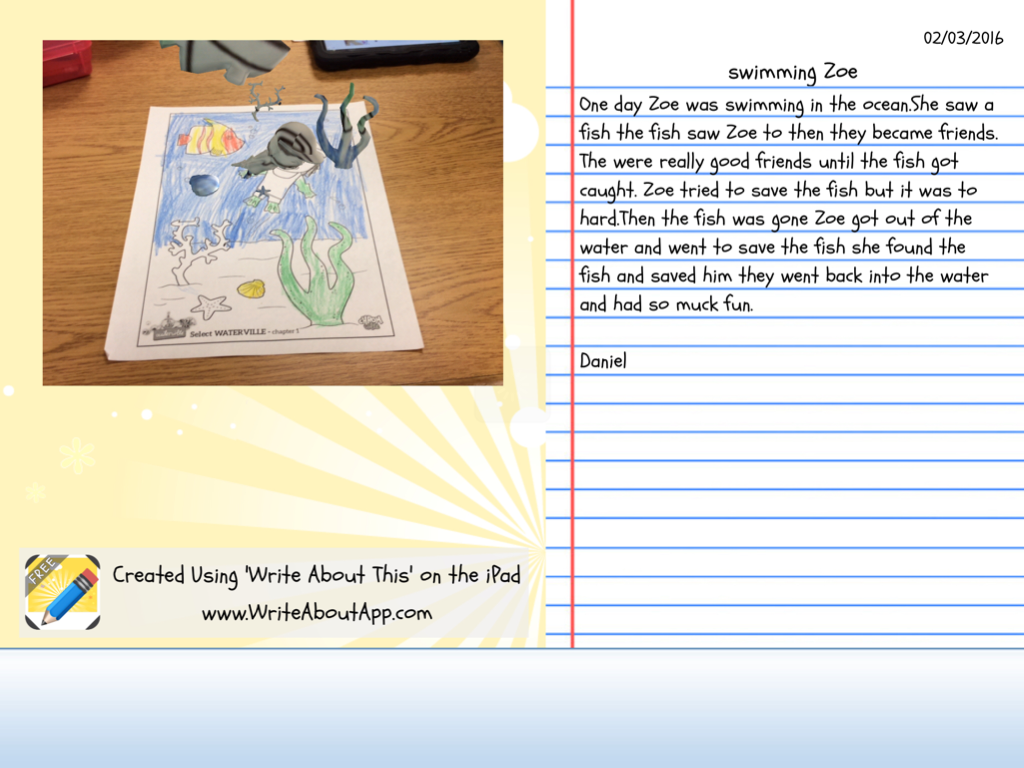
I have been wanting to use Augmented Reality in a lesson for a while and finally figured out a way to do it.  I am using a Chromville coloring page to inspire writing in my 2nd graders.  Chromville is a website and an app.  Print the coloring pages from the website and thenuse the app to make them "come to life".

I printed off a page from the character, Zoe's stash.  I gave the students about 10-15 minutes to color and told them to be thinking about a story that could go along with the picture of Zoe swimming. 

When they finished coloring, we used the iPads and the Chromville app to make the picture in an augmented reality picture of Zoe swimming and diving with the fish.

The students are super excited to see the picture come alive.  It is always so fun to see their reactions.  The hardest part is keeping the iPad still for the 3 seconds it takes for the camera to read the picture. 
Within the app there is a camera button so the students took a picture of their 3D picture.  Then we opened the Write About This App (we used the free version which only allows you save one story, but there is a paid version where you can save multiple times).
This app allows you to import a picture and then write a story to go along with it.  The students put imported their picture and began writing.
When they finished, the can save it to the gallery and email or save it to the camera roll.  THis was a fun way to change up writing.  I think using the Augmented Reality picture helped to engage them a little more than just a promt.  


Friday, January 29, 2016

Friday "Wrap Up"

We wrapped up our 2nd round of makerspace this week and I must say, finger knitting by far was the biggest hit. What was most fun was seeing kids the faces of the kids I didn't think would have the patience to learn the process end up making a necklace or bracelet they were so proud of. I wish I had taken more pictures.  This is one of my 4th graders who went home and created 4 necklaces after being in the makerspace. 

The rest of the week went like this...
- 3 Second grade Fairy Tale Battle introductions
- 5 kinder Storytimes with Rubia and the Three Osos (including one hilarious story time with our ESL kinder class who definitely knew more Spanish than me)
- 4 makerspace sessions
- 1 Fifth grade Virtual Valentine iPad lesson
- Coding Club and Newspaper Club meetings 
-1 Bluebonnet Voting Party - Vanishing Coin was our winner

And my nails this week are super cute if I do say so myself - True Love and Tartan


Friday, January 15, 2016

Friday "Wrap Up"

Whew!  These last 2 weeks have been crazy!

I have been doing all day research with 3rd grade classes which has taken up these two weeks.  They spend the whole day except for lunch, recess and PE. Each class researches a Force of Nature... hurricane, tornadoes, volcanoes, wildfires, avalanches, and earthquakes.  Then we make a graphic novel on the iPads with the students as characters.  This project smashes 4 different apps together to create the graphic novel so it is a pretty involved procedure, but the kids are so excited when we finish.  

This week
- 4 days all day research
- 2 sessions of 4th grade Battle of the Book Introduction
- Attended library professional development
- Worked on a badge project for teachers
-5 kinder storytimes

And my wraps this week are Friday Flannel and Fame 

Tuesday, January 12, 2016

Technology Tuesday: Badges for Teachers

I am not sure when I first heard about digital badges, but it is something I keep coming back to as something I'd like to try.  And I think the time has come...

I know the power of being a connected educator and I want more people on my campus to experience the spark that a PLN can ignite.  I think they just need a little push so here I go jumping into something and flying by the seat of my pants again.  Many of the teachers on my campus are taking baby steps out of their technological comfort zones and I would like to find a way to acknowledge and encourage them.  I think digital badges might be a fun way to do this.  

I had a few articles saved in my "pocket" about badges and it has come up a couple of time in Twitter chats that I have been in this fall.  Back in October after one such chat, I emailed my teachers and asked who might be interested in earning badges for different technological tasks or achievements.  I gave them a couple of examples of badges I had created on credly.com
I told them they could earn these badges and then print them out to display in the classroom and/or post them on their blogs and I asked them to email me back if this is something that might interest them.  I received quite a few "Yes!" responses and so it was something I had on my "to be continued" list. 

Recently in an #edtechchat over the winter break, Shawna Ford tweeted
which got me thinking about it again.  I went back and reread the articles and tweets I had saved and got to work.  I reread "Building a Better Badging System" by Marc Toner and Alice Keener's  "Creating Badges with Google Sheets" .  Then Shawna Ford tweeted out a link to her blog post about "Professional Learning Options" and badging which pointed me to more models.  

So I think I have a working (in-progess) system to offer teachers.  I have created a page on my library website where I will post the different badges they can earn and a link to a google form they can fill out to request the badge.  I will receive an email when a form has been submitted and then through credly.com, I can "send credit" to them where they can then print and/or display on their blog by following these directions.

I am going to cross my fingers and hope I have thought this through.  Lucky for me my teachers are pretty flexible so if I screwed something up they will patiently wait until I can figure it out.  I am excited about this and am looking forward to seeing how badges might fuel growth at my campus.  

I would love to to hear any ideas about badging or how you have used digital badges with students or teachers.

Monday, January 11, 2016

Makerspace Update

Happy New Year!  Where does the time go?

We are in our 3rd round of makerspace activities here and so far things are going well.  You might remember, the first time they came to the space we all did the pipe cleaner challenge.  You can read about that here.  For the second round, they had choices based on STEAM activities (not for every letter though).

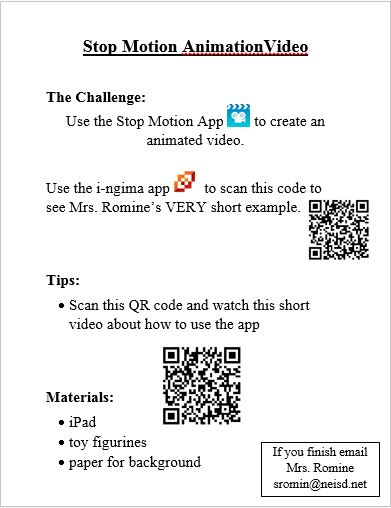
Technology - Stop Motion Animation video
Engineering - Tennis Ball Tower
Art - Origami

I have task cards for each of the activities but still have to do some explaining when all the students arrive.  Here is an example of the task card for the Tennis Ball Tower (I got the tennis ball tower idea from this blog which I found on Pinterest)


Some of the task cards have QR code links to how-to-videos like the Stop Motion Animation task card. 

This was really an eye-opening station for me to see how creative the students were.  Some just took off with it.  Here is an example of one some 5th grade girls made.


For origami, I printed out and laminated pages from this website .  These directions with the pictures were pretty easy to follow.  However, for the 2nd graders, I recorded myself making 3 things and then put a QR code to the video so they could follow along that way.  It worked better for the younger ones than the written directions.  


The kids are loving the makerspace so much and have asked how they can do this stuff at home so I put links to the activities on my libguide so they can access the videos and directions at home.

The one thing I am still struggling with is getting them to stop and clean up when it is time.  It is a disaster when they leave some times!


Tuesday, December 8, 2015

Technology Tuesday: Kodable

I decided to make sure that I did Hour of Code this year with kindergarten but to use an iPad app instead.  We are using Kodable and it is too fun!  The kids love trying to solve the puzzles and get really excited when they get it right.  The teachers were amazed at how the app just walked them through and they even grabbed an iPad and started working the puzzles as well.  I love that now they can add that app to their iPads in the classroom and use it as a station.