Showing posts with label professional learning. Show all posts

Sunday, February 19, 2017

#EdCampNavasota

Saturday, one of my teachers, Kandra Overturf (@kandrarene) and I attended #EdCampNavasota (3 hours away from San Antonio) at Webb Elementary, the campus of Todd Nesloney (@TechNinjaTodd).  A few of my other twitter heros were there as well... Aaron Hogan, Aaron Marvel, Brent Clarkson and Tom Spall. And I met some great new educators to follow Cassie Reynolds, Stephanie Ryon and Jeremy Stewart to name a few.

Why did we leave Friday night and give up a Saturday for this? We are both huge fan girls of TechNinjaTodd and wanted to see in person the kind of learning that takes place on his campus.
But also we wanted to experience another morning of connecting and learning EdCamp style and put some faces to our PLN.  If you haven't experienced an EdCamp before, it is truly a different kind of professional development. There is not ONE person leading the pd.  It is a collective effort among the participants.

 It starts with people writing down topics or questions that they want to learning about on post-it notes and sticking them on a big board, grouping like topic together.  Yellow post-it notes were for topics and pink post-it notes were people who felt comfortable discussing a particualr topic.
Then the organizers of the EdCamp organize the topics and assign a "moderator" just to get the conversation started.  


This is what our sessions looked like.  

The problem comes when there are two (or three) sessions at the same time that you want to be at... Kandra and I split up for a couple and took notes in a shared google folder so we could essentially be in two places at once.  Three was a little more difficult. The great thing was that people were sharing out their learning on the hastag so all I had to do was follow the hastag to pick up some of the great ideas.  

I picked up a couple of really great ideas from the student motivation and campus culture sessions that I am going to take back to my campus to share.  I also got a little better idea of how I might use snapchat or instagram with my students.  One of the best ideas I heard was about Twitter Moments.  Aaron Hogan shared about that in the Socail Media session and it was an eye-opener for everyone in the room.  Aaron blogged about moments here.  And here is an example of a quick one that I put together while he was explaning.  #EdCampNavasota Moment.  What a great way to capture and tell the story of a school, classroom or in my case library.  

When we were leaving Saturday, Kandra said "Well, that was great.  We can check that off our bucket list."  Then today I get this tweet...
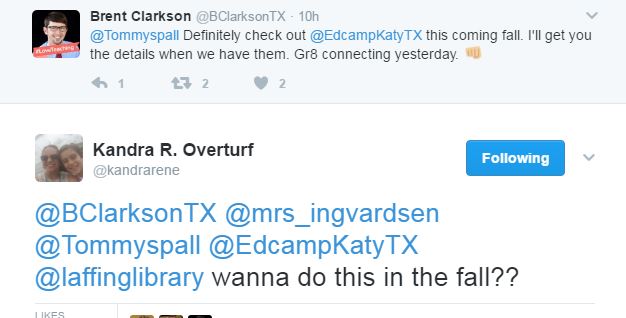


My reply..
Why keep all this great learning to ourselves... Hoping some others will join us at #EdCampKaty.


Sunday, February 12, 2017

Reflections from TCEA17

I was fortunate to spend 3 days last week at the TCEA conference in Austin, Texas.  19 hours of amazing presentations and that doesn't count the conversations standing in the hallway waiting in line for a session.  Conferences like these are always so overwhelming with information that it takes me a few days to process all that I have heard and learned about.  There was not one session this year that I thought was better than all the others.  Rather every session that I went to offered me something I could take back to my campus.

Here are a few of my take-aways.

Sphero - Emily Felker (@emfelker) did a great job of introducing Sphero as an educational tool instead of just a toy to drive around the library.  While sitting in the session I texted one of my 2nd grade teachers with an idea for using sphero with place value that Emily shared.  She also introduced me to making light trails by using the slomo feature on a camera to capture sphero's light in a dark room.


Sharing Student Work With Each Other-  Google slides now has a Q&A option when you are in the presenter mode where students can ask questions during the presentation, but they can also post work there when finished for classmates to look at.  The same could be done with Padlet.  I have used padlet as a brainstorming tool, but never thought of it as a place to house student projects all in one place.  

Google Virtual Reality Tools - Kelly Fitzgerald (@LISDTechie) led an engaging session on google virtual reality 
Geoguesser - shows a scene from somehwhere in the world and then you try to guess where it it based on landscape, signs, terrain, etc
Google Art Projects - can see a piece of art work and zoom in on the brush strokes and in some cases where it is hanging in the museum to see other art work around it.  (CAUTION... Where there is art there can be inappropriate items for elementary)
Google Street View - can drop into places around the world to see 360 degree view of where you land.  Great for landmarks and ecosystems.

Personalized PD - a panel session with 4 amazing leaders Todd Neslone (@TechNinjaTodd), Jessica Torres(Owl_b_TorresEdu), Jason Bretzmann(jbretzmann), and Mandy Taylor(mandymtaylor).  So many great things came out of this session.  One being getting a picture with TechNinjaTodd!

All 4 educators were adamant about giving teachers choice in their professional development 
And that even if only 5 teachers attend a session, that is 5 more teachers that know about a tool.  That is growth.

TabScissors - this was not technically in a session, but it is one of the best things I learned about!  Before her Google VR session, Kelly Fitzgerald was asking people about things they had learned so far and she shared the chrome extension TabScissors.  This extension allows you to split a window into two smaller windows side-by-side!

Here I have 3 tabs and have to toggle back and forth. 


But by using TABSCISSORS, I can split the tabs and have two windows showing at the same time. 

This is life changing!!  

And one more fun thing.  Have you heard of Bitmoji?
It is an app and a chrome extension that allows you to create your own personalized emoji chatacter. Now besides annoying the people that you text...

which is super fun in itself, but how fun to put them on work that your students are working on in google docs?  Kind of like your own personal stickers... and what kid doesn't love getting stickers?
     

I always learn so much going to these conferences.  Too much to actually post about in one blog. I will write more as I put the tools into practice or share them with teachers.  


Tuesday, August 30, 2016

Technology Tuesday: Summer Twitter Challenge for Teachers

This summer I challenged my teachers to explore twitter.  I wanted them to have a relaxed time to figure things out at their own pace.  I knew the first thing they would say is "I don't know what to tweet about!" So I tied in Donalyn Miller's #bookaday hashtag.  I told the teachers to tweet a picture of ANYTHING  they read during the summer.  It could be a picture book, a grown-up book, a young adult book, a magazine, a blog post... anything. They just needed to put the #bookaday with the tweet. We talked about how they could write a little bit about the book if  it was a picture book or chapter book they might use with their class.


It was really fun!  About 15 teachers participated.  


On the first teacher day back in August when we met as a faculty, I handed out Twitter Badges and a gift certificate for our Fall book fair - the $ amount was the amount of books they read... they ranged from $5-$50!!!).  

Now those teachers that participated are more familiar with tweeting and are starting to tweet things about their class this year.  It will be fun to have more connected educators on my campus.  

Tuesday, January 12, 2016

Technology Tuesday: Badges for Teachers

I am not sure when I first heard about digital badges, but it is something I keep coming back to as something I'd like to try.  And I think the time has come...

I know the power of being a connected educator and I want more people on my campus to experience the spark that a PLN can ignite.  I think they just need a little push so here I go jumping into something and flying by the seat of my pants again.  Many of the teachers on my campus are taking baby steps out of their technological comfort zones and I would like to find a way to acknowledge and encourage them.  I think digital badges might be a fun way to do this.  

I had a few articles saved in my "pocket" about badges and it has come up a couple of time in Twitter chats that I have been in this fall.  Back in October after one such chat, I emailed my teachers and asked who might be interested in earning badges for different technological tasks or achievements.  I gave them a couple of examples of badges I had created on credly.com
I told them they could earn these badges and then print them out to display in the classroom and/or post them on their blogs and I asked them to email me back if this is something that might interest them.  I received quite a few "Yes!" responses and so it was something I had on my "to be continued" list. 

Recently in an #edtechchat over the winter break, Shawna Ford tweeted
which got me thinking about it again.  I went back and reread the articles and tweets I had saved and got to work.  I reread "Building a Better Badging System" by Marc Toner and Alice Keener's  "Creating Badges with Google Sheets" .  Then Shawna Ford tweeted out a link to her blog post about "Professional Learning Options" and badging which pointed me to more models.  

So I think I have a working (in-progess) system to offer teachers.  I have created a page on my library website where I will post the different badges they can earn and a link to a google form they can fill out to request the badge.  I will receive an email when a form has been submitted and then through credly.com, I can "send credit" to them where they can then print and/or display on their blog by following these directions.

I am going to cross my fingers and hope I have thought this through.  Lucky for me my teachers are pretty flexible so if I screwed something up they will patiently wait until I can figure it out.  I am excited about this and am looking forward to seeing how badges might fuel growth at my campus.  

I would love to to hear any ideas about badging or how you have used digital badges with students or teachers.