Showing posts with label 4th grade. Show all posts

Tuesday, January 10, 2017

Technology Tues: 3D Printing From a Pro

This week my 4th grade students were treated to an introduction to our 3D printer from a pro.  Travis Howk, a senior at Hendrix College in Arkansas, and the son of one of my very good library friends, explained 3D printing to my 4th graders better than I ever could!  Travis is a math and physics major but got involved in 3D printing when he discovered his campus had one.  He learned about it by watching and asking questions and pretty soon was teaching others how to use it.

This week, he spent an hour with each of my 4th grades. First, talking about what 3D printing is and showing them actual models of things he printed (all plastic, of course).

  Then he rocked their world when he told them you could 3D print pancakes, chocolate, clothes, and a house in less than a day.


Travis encouraged questions and answered all of them.  From the silly ones about 3D printing characters and logos to very thoughtful ones like "What will happen to construction workers if houses can be 3D printed?"

Students then logged in to Tinkercad where Travis walked them through creating a name plate.


 The students were so excited and proud of their designs.  

The 4th grade teachers and I am thinking of a way we can use the 3D printer with their research project coming up later in the spring.

We had a great day of learning from an awesome young man.

Tuesday, September 20, 2016

Technology Tuesday: Dot Day Aurasmas

Last week for Dot Day, my 4th graders thought about their goals for the year and how they were going to make their mark.  In class, they wrote out a script and colored a dot and then brought them to the library to make aurasma videos of themselves reading their goals using their dots as the trigger. We are planning to hang the dots in the hallways for other students to watch.


Tuesday, October 20, 2015

Technology Tues: Kate Messner Google Hangout

Writing, Writing, Writing... It is definitely an area that our school is concentrating on every year. Especially our 4th grade students that have to take a state writing assessment.  

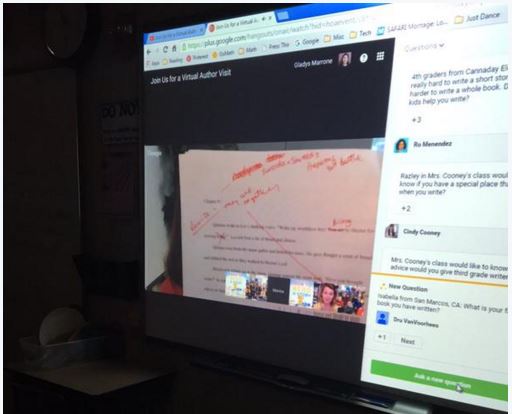
Today, some of my 4th grade classes participated in Kate Messner's Google Hangout sponsored by We Are Teachers.  

She was specifically discussing the writing process of her Ranger In Time series.  This series is about Ranger, a search and rescue dog, who travels back in time to help people.  

Kate was so open about showing different parts of her work.  She held up her writer's notebook with her brief phrases about ideas.  She showed a long piece of paper where she collects all her ideas about a story in one place before she starts.  

The students were shocked to hear that it took almost 2 years to write and publish a book!  They were also glad to hear that even professional writer's have their papers marked up by editors.  


Our students were also surprised to hear one of the guest classes ask a question about what kind of "leads" Kate like to use in her books.  That class was in a totally different state and they called the beginning of their stories "leads" too!  

It sure does make more of an impact on kids when they hear that students in other states and professional authors go through the same writing process that they do... another example of the power of being connected.  


Wednesday, March 25, 2015

Twitter Chatting with Students

Last week, one of the middle school librarians in my district, Irene Kistler (@irenekistler) and I were talking about how fun it would be to have the students in our district be able to chat and share via twitter.  She had been tossing around the idea after seeing a tweet from New Zealand .  We decided to make it easy since it was our first time and the week we came back from spring break.  We had 2 questions.
Q1:  What did you read over spring break?
Q2:  What did you do for fun over spring break?

Irene had a form that the students could fill out and then bring to me to get approved.  Then I took them to the computer and let them tweet.  I had the chat up all week on my Smartboard in the library and the students were thrilled to see their tweets pop-up on the screen.  

We also wanted the students to be able to give a shout out to a teacher, so we added that as a 3rd response on the form.  Not all of my teachers are on twitter, so I emailed the tweet to them if a student mentioned them.  

Irene and I let the other librarians in our district know about this and some of the G/T teachers.  As a matter of fact, one of our G/T teachers, Terri Eichholz (@terrieichholz)  wrote about how she used this idea in her classroom here.  It was fun to go through and read the tweets from different campuses. The part that I was missing though, was the students being able to read and respond to others' tweets. Irene had a great idea to have a week of questions and then a week to be able to read and respond. We are in that process now, so it will be interesting to see how that turns out.  


Today, some of our 4th grade students that were in the library during checkout had the opportunity to participate in the #stu2stuchat set up by Sandy Otto (@sandyrotto).


I had seen Sandy publicize this post over the weekend and made a note to check it out.  I happen to have 4th graders checking out at that time so I called a few over to check it out and a few turned into more.  
A couple of our students tweeted, but they really enjoyed seeing what other students were reading. We have plans to join the next #stu2stuchat on April 8th.  


I love that we are venturing in to connecting our students and letting them see things outside the walls of our school.  


Tuesday, February 24, 2015

Technology Tuesday: Skyping

Another item checked off my professional bucket list!  Been scared to do it until now.

I finally connected with another class via skype!  Well, actually we tried skype and my sound settings were messed up so we switched real quick over to a google hangout video chat, because you always have a plan B for technology, right?

Back at the beginning of February, I saw a tweet about ConnectED Bingo by Brad Gustafson.  I loved the idea and since I don't have a class of my own, I sent an email out to all my teachers telling them about it.  I suggested they could do it whole class, send it home for kids that wanted to do it at home or have students do it during our whole school intervention time in the morning.  I even threw in $5 gift certificates for the book fair for students who completed a bingo and a $25 if a class completed a bingo.  I have loved watching the tweets of my teachers as they post the student completed squares.

One of the squares is to hold a book talk with another class to discuss a book or author using skype or google hangouts.  One of my 4th grade students wanted to discuss Rump by Liesl Shurtliff.  So through the power of twitter, Ms. Melissa Guerrette in Maine replied back to my tweet searching for some students who would like to talk Rump.

Yesterday, we connected Texas to Maine.  They laughed when we said we were having a cold front and it was 30 degrees.  My 4th grade student had a list of questions that Ms. Guerrette's students graciously answered as they talked about their favorite part or the book, which character they would like to be, what they would have done differently if they were Rump and so on.  We even found out their class had skyped with Liesl Shurtliff!  How cool is that!

It was such an awesome experience. I am not sure who was more excited me or my 4th grader.  I can really see the power of classrooms connecting and hope I can convince more of my teachers to try it.  

Friday, December 12, 2014

Hour of Code


I finally got to do some coding with students today.  I've had first grade research going on all week taking up most of my time and they were on a field trip today so I invited some 4th and 5th grade classes to the library.  After a quick explanation and demonstration of the Angry Birds tutorial I let them loose on iPads and computers.  Some worked with partners and some worked alone.  I loved the excitement and the problem solving that I saw in these hours.  The partners would high five each other as they advanced and some really advanced far in the hour they had.  Some of the students even had a chance to work on the Lightbot app I had downloaded on the iPads because they finished the Angry Birds tutorial.


I am hoping to start a coding club in the spring and would love to know of any other apps or websites that you have used for coding.

Tuesday, September 2, 2014

Technology Tuesday: QR Code Orientation

Rather than stand in front of my 4th graders and show a Power Point while I bore them to tears about the different parts of the library and procedures whey must follow, I decide to have them to a QR code Scavenger Hunt for their Orientation.  I made a list of 22 places in our library I wanted them to know about... the check out desk, the biography section, the smartboard, the iPad cart, etc.  Then I made a list of 22 questions like "How many shark books do we have in our library?", "How many books can you check out at a time?", "What kind of books are in the 398.2s?".  Then using the website QR Stuff, I made a QR code with the answer to each of the questions.  Once I made the QR code, I opened an Excel document and pasted the QR code into a cell and the answer in the cell below the code.  For the actual recording sheet for the students, each number 1-22 had a "location" and a "question".  The location was where they needed to go to find the code and the question they needed to answer by scanning the code at that location.  For example: #1 Location: Magazines   Question:  How many shark books are in our library?  The code that was taped to the magazine shelf had the QR code with the answer "62" which is the number of shark books that we have.  I partnered the kids up and had each partner group start at a different number so they would not get traffic jammed - although they still did.  I also asked them to move away from the code to write the answer(since the answer was on the iPad) once they scanned it so other groups could get to the code.  All in all, it was a noisy, engaging, informative lesson where the students were actively reminded of places in our library, procedures and interesting facts and not one of them fell asleep.